


Micropace
Starting the system


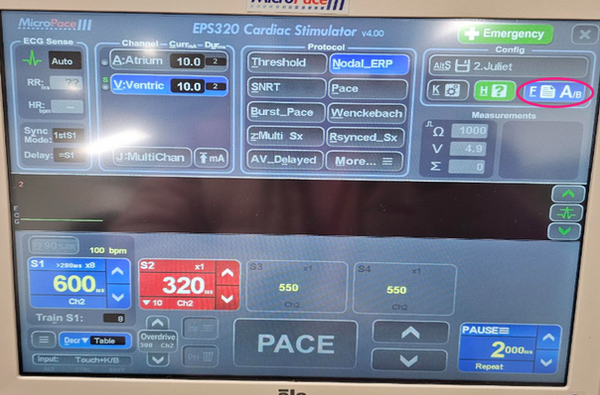
Selecting & programming configurations
-
AltS to select setting
-
choose setting (e.g., 2.Juliet)
-
R/Restor to choose setting
-
S/Save to save changes to setting

Selecting pacing channels
-
Stim & detect 1 (atrium)
-
Stim & detect 2 (ventricle)
There will be slight variations in channel selection from system to system (e.g., LS Pro to Claris)


Adjusting sensing
-
A dot will appear on the signal sensed
-
To adjust sensing use arrow keys to adjust the “sensing fence” to uncover the signal or hide a signal
-
If nothing is sensed in a synched mode, a time out will occur and pace asynchronously. A single tone will occur when this occurs.

Sensing settings
ECG sense
-
Auto: whichever channel you’re pacing from (ideal)
-
CH 1/3: channel atrium
-
CH 2/4: channel ventricle
-
Ext1: ECG
Sync Mode -
1stS1: Synchronous 1st beat (ideal)
-
ASYNC: Asynchronous
-
Inhibit: AAI/VVI mode
these settings can be adjusted using the +/- keys
ECG sense Auto:whichever channel you’re pacing from (ideal) CH 1/3:channel atrium CH 2/4:channel ventricle Ext1:ECG Sync Mode 1stS1:Synchronous 1st beat (ideal) ASYNC:Asynchronous Inhibit:AAI/VVI mode

Flipping pages
-
I usually set up page A as my standard synched protocols and page B as high output ASYNC pacing (for back-up pacing or phrenic capture)

Protocols


Protocols & pacing rates

Troubleshooting


Further Resources

