


Claris
Starting the system


Starting the case


Amp configurations


Stimulator


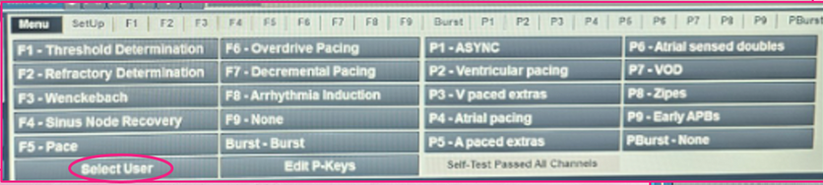


Stimulator protocols
ASYNC pacing
-
I like to have an ASYNC pacing page to use for emergency back up pacing or phenic stimulation pacing (high output)
-
Sync must be OFF or it will not pace

Straight pacing
-
I like to have a straight pacing page for each the atrium and ventricle, as well as a ventricular overdrive (VOD) pacing page at a faster rate for when tachycardia diagnostic pacing/tachycardia termination is required.
-
Straight pacing for the atrium and ventricle can be used for incremental/decremental pacing (manual rate change) or for straight pacing.
-
The pacing must be synched to the chamber that is being paced.


Ventricular & Atrial paced extras
-
I like to have a page for paced extras for each the atrium and ventricle
-
Paced extras can be used for antegrade/retrograde curves, VT stims and tachycardia induction.
-
Extras beats can be added if required (up to S4).
-
Auto decrement can be used for the last extra (pre-int I/D -10, -20) or can be manually adjusted (pre-int I/D 0)
-
The pacing must be synched to the chamber that is being paced.


Ventricular & Atrial sensed extras
-
I like to have a page for sensed extras for each the atrium and ventricle
-
Sensed extras can be used for dual AV node assessment, tachycardia induction, and HIS synchronous VPBs or early APBs during SVT.
-
Extras beats can be added if required (up to S4).
-
Auto decrement can be used for the last extra (pre-int I/D -10, -20) or can be manually adjusted (pre-int I/D 0)
-
The pacing must be synched to the chamber that is being paced.


Stim updating & calipers
-
Calipers can be controlled using the mouse, lt click to lock in caliper 1 & 2, rt click to move caliper, 2nd rt click to remove caliper
-
G will place triggered caliper on screen which
can be adjusted as desired


Logging events

Ablation generator

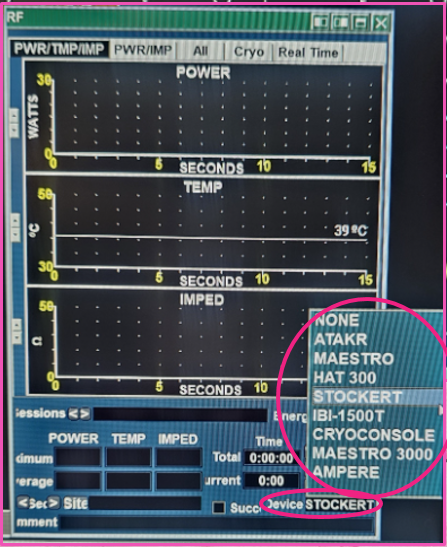
Template

Timer

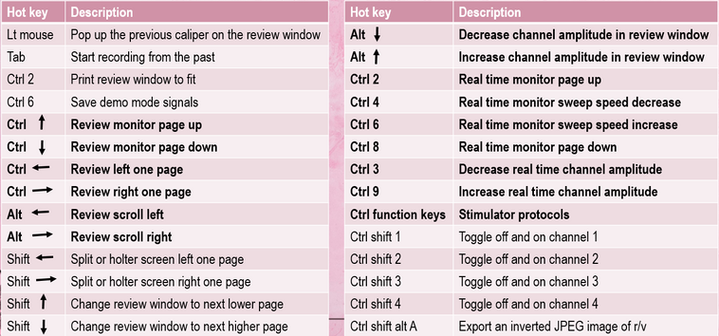
Key board controls



Ending a procedure

Shutting down

-
Switch off AMP & power source!